
Calendar Restore
Bring back deleted calendar events.
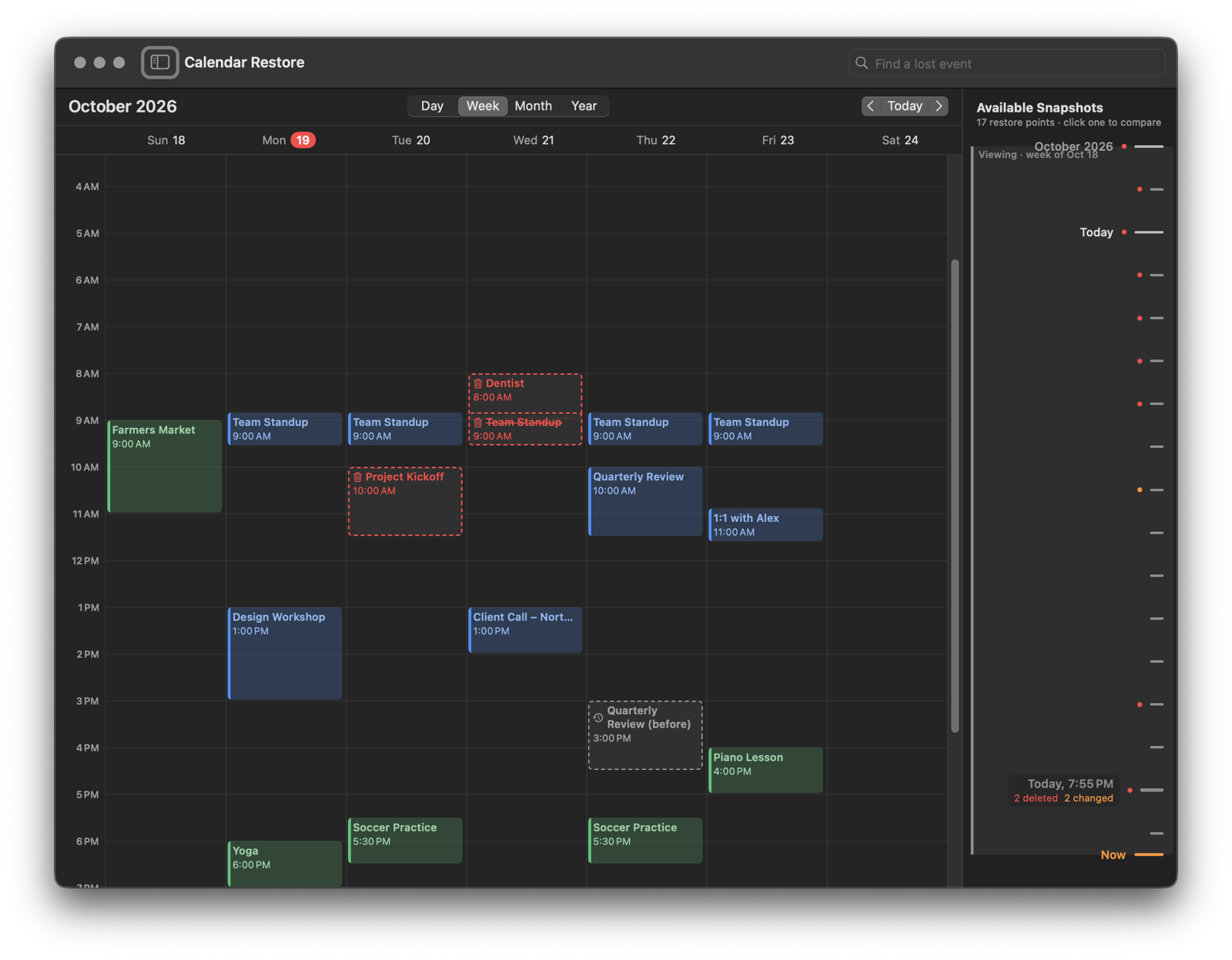
Your calendar, with an undo
Deleted a meeting by mistake? Calendar Restore keeps snapshots of your Mac’s calendars and puts back just the event you lost — without rolling back anything else.
Deleted by Mistake
A meeting, an appointment, a whole repeating series: pick a snapshot from before and put it back.
Changed by Mistake
See how an event looked before it moved or was edited, and restore the earlier version.
New Mac? Still There
Snapshots kept in your iCloud survive a lost or replaced Mac, and show up on your new one.
See Calendar Restore in Action
Below is a sample week in Calendar — and Calendar Restore, ready to bring things back. Follow the steps, or just explore. Hover over any part to see what it does.
A sample calendar for illustration. The Calendar here is a simplified stand-in for Apple’s Calendar app, and the demo saves a snapshot as soon as you add an event; the real app saves one every few hours when something changed. Nothing here touches your own calendars.
The Snapshot Timeline
Every snapshot is a tick on a timeline beside your calendar. Click one to see what changed since.
Restore One Event
Put back a single event with its time, place, notes, link and alerts, into its calendar or another.
Nothing Else Touched
Everything else in your calendar stays exactly as it is. Restored events sync like any event you create.
Safe in Your iCloud
Copies go to your own iCloud account, never to us. The developer collects no data at all.
Calendar Restore’s Fundamental Features
Automatic Snapshots
Every few hours, whenever something changed, a compact snapshot of your calendars is saved. Kept for up to two years.
Day, Week, Month & Year
A familiar calendar shows what was deleted, changed or added since any snapshot.
Repeating Events
Bring back a whole series with its edited and deleted occurrences, or just one occurrence.
Find a Lost Event
Type part of its name to find it in every snapshot, even if you don’t remember the date.
Filter the Changes
Show only deleted, changed or new events, hide calendars, or set repeating events aside.
Copies in iCloud
Optional copies in your own iCloud survive a lost Mac and show up on your other Macs.
Time Machine, Too
Restore from Time Machine backups, including ones from before you installed Calendar Restore.
Private by Design
No accounts, no servers, no tracking. Your calendars stay on your Mac and in your iCloud.
Uninstalls Cleanly
One menu item turns off the background helper and removes everything the app keeps.
Get Calendar Restore
Help and support →