
Almost every small business we walk into has something it calls a backup. An external drive plugged into the server. A folder syncing to the cloud. A box somebody bought a few years back that still has a light blinking on it. The owner knows it's there, knows roughly what it's meant to do, and has never once watched anything come back off it.
That last part is the whole problem. A backup isn't something you own, it's something you prove. Until a file has actually been pulled back off it and opened, what you have is a device with a light on it and a comfortable assumption.
This is the one that catches people most often. Dropbox, OneDrive, Google Drive - these are sync tools. They copy whatever is in the folder up to the cloud, which sounds like a backup right up until something goes wrong. Delete a file and sync faithfully deletes it everywhere. Let ransomware encrypt a folder and sync faithfully uploads the encrypted version over your good copy. Sync is very good at making sure every copy matches. That is exactly what you don't want when the thing it's matching is broken.
Most of these services do keep version history, and it can genuinely save you. But it's usually limited, and working out how far back yours goes while the office stands around waiting is not when you want to be learning it.
It stopped months ago and nobody noticed. Backup software fails politely. A drive fills up, a password expires, an update breaks a service - and the job just stops running. The light on the box keeps blinking either way.
It's backing up the wrong thing. The file server is covered, but not the accounting database that's open all day and therefore skipped. Or everything is covered except the one workstation belonging to the person who keeps every important document on their desktop.
It's attached to the thing it's protecting. A USB drive left plugged into the server sits on the same power strip, in the same room, on the same network as the thing it's supposed to survive. Fire, theft, flood and ransomware all take the backup with them.
For clients on a maintenance plan we use NinjaOne Backup. Backups are written to a local drive on site and to NinjaOne's cloud, so there is a fast copy in the building and a copy that survives losing the building. No extra step for anyone in the office.
The system images are the part worth understanding. An image backup isn't a file backup - it's a picture of the entire disk, Windows and the programs and the settings and the drivers, the lot. When a machine dies, that's the difference between restoring it and spending a day and a half reinstalling Windows and hunting for licence keys.
Backups run daily at 8pm, measured against each machine's own local time, so they happen after hours rather than while somebody is working. Weekends included - data doesn't only get lost Monday to Friday.
Retention is where plans tend to be either too thin to help or so fat you're paying to store noise. A typical build keeps, on the local drive, every daily backup for 45 days, then weekly ones for another 12 weeks, then monthly out to six months. The cloud side keeps dailies for a week and weeklies out to a month.
The asymmetry is deliberate. The local drive is cheap and fast, so it carries the long tail - that's where you go for "this spreadsheet was fine back in March." The cloud copy is the disaster copy, the one that exists for the day the office doesn't, and it doesn't need six months of history to do that job. Those numbers get tuned to the business; a firm with compliance obligations gets a different shape to a three-person office.
Back to that first quiet failure. Because this runs through the same system we use to manage the machines, a failed job raises an alert on our end rather than writing a line in a log nobody reads. You are not the monitoring.
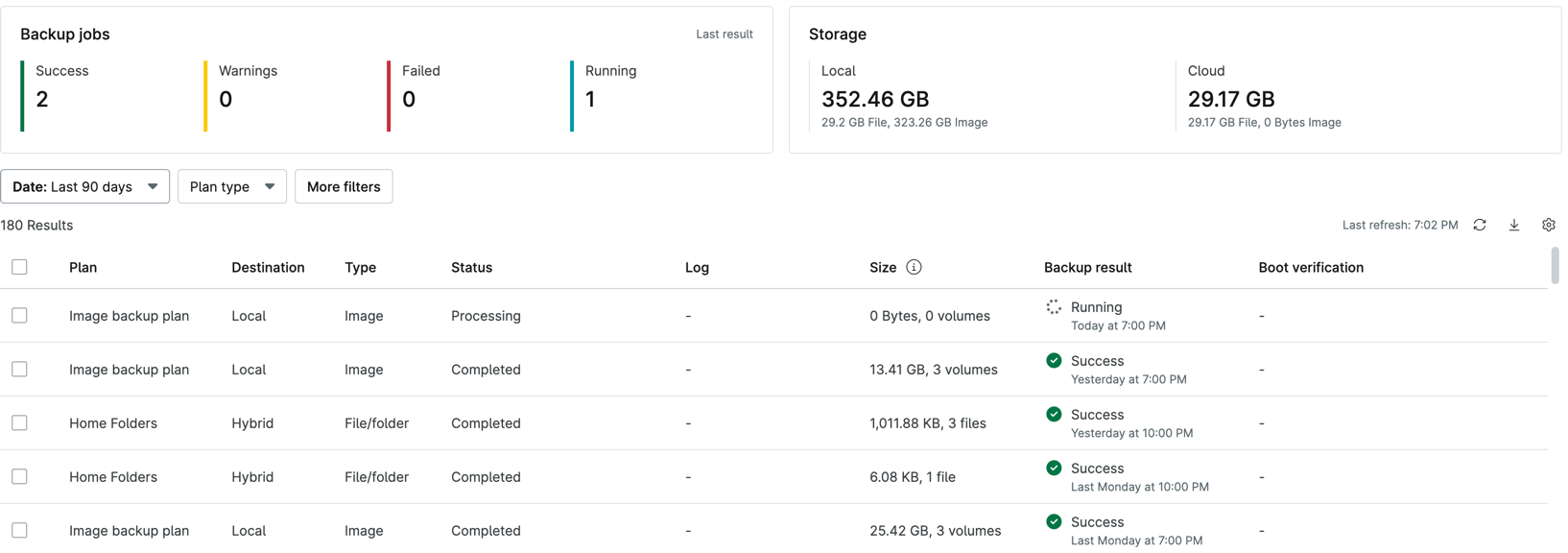
What we look at: every job, what it covered, how big it was and whether it actually finished.
Count it against the old 3-2-1 rule - three copies of your data, on two kinds of storage, one of them off-site - and it lands where it should: the live data on the machine, the image on the local drive, the backup in the cloud.
A restore. Not a green checkmark, not a nightly email saying the job completed - an actual file pulled back and opened. Pick something ordinary, restore it into a different folder, and open it. Nothing gets deleted and nothing is at risk.
If that takes twenty minutes and a phone call to someone who left the company, you've just learned what a real emergency looks like, multiplied by everything. Better to find that out on a quiet Tuesday.
If you're not sure which kind of backup you have, that isn't an embarrassing position - it's the normal one. Nobody thinks about backups until the week they matter enormously. Give Silver Smith Solutions a call at 909-363-6233 and we'll find out together, starting with the only test that counts.